Macintosh Plus

It’s been a while since I last posted anything on here…

Here’s another tech post for you:

Recently, I have added a nice vintage computer to my set of modern devices.

I introduce to you the Macintosh Plus. Mine was specifically manufactured
circa 1987.

Behold it in all it's glory
Behold it in all it’s glory

This Mac Plus includes the following specs:
8MHz Motorola 68000 32-bit CPU
1MB of SIMM RAM (Upgradable to 4MB)
800kb Dual Head Floppy Disk (unfortunately is currently broken)
7″ Monochrome CRT Display
Original Mac Plus Keyboard with Number Pad
Original Mac Plus Mouse M0100

No hard drive. Up until the Mac SE, these computers didn’t come with a hard
drive standard and had to run everything, including the OS, on floppy disks.
You first loaded the system floppy to startup the computer, then ejected
the system disk to load your software of choice. This meant you then
swapped back and forth between the sofware disk and the system disk. For
example, running System 6.0.8 and MacPaint required swapping floppies at
least 6 times before you could use MacPaint! Talk about dedication.

I found this particular computer on eBay and got it including keyboard and
mouse for just over $100. Included was also the original box it came in,
although the user maunals and origianl diskettes are missing. The unit
itself is in pretty good condition; not too much dust on the inside and only
minor yellowing on the outside. I took some water / isopropyl alcohol
mixture and wiped down the case, keyboard, and mouse. The mouse I had to
clean more extensively (Remember cleaning mechanical mice a decade
ago?)

Cleaned and up and running

In order to open the case, you needed to have an extended Torx 15 bit that
was at least 5″-6″ long to open two hard-to-reach screws. Yes, even back
then, Apple Computers used proprietary tools to open up thier computers.
Once inside, the case splits into two major parts. The front houses all the
components, including logic board, display, and power supply. The back
contains vent openings on the top, the handle, and protects the front
portion of the computer. Interestingly, inside the back cover contains the
engraved signatures of the original Macintosh design team. Steve Job’s
name can faintly be seen near the center.

Signatures on the back of the original Macintosh design team
Signatures on the back

I was able to dust out the logic board and power supply and also check the
connections and components of the two. The power supply was in excellent
condition and had no leaking capacitors or scorch marks. The logic board
was also in excellent condition, coated with only a slight layer of dust.
Unfortunately, the floppy drive wasn’t in good shape, making a whining
noise upon starting up the computer. Opening up the floppy drive revealed
that one of the gears for the eject mechanism was flaking and falling
apart. Luckily, there’s a 3D printed replacement that is readilly available
from a seller on eBay. As soon as that gear comes in, the floppy drive should
be operational. I was also able to replace the PRAM battery. The PRAM is in
charge of saving the date, time, sound, and mouse speed settings whenever
the computer is turned off.

Guts on the inside
Guts on the inside (don’t touch the back of the CRT!)
Broken gear...
Broken gear…

So you may ask, how was I able to test anything and run programs with a
broken drive? Some quick Google-fu revealed that there is an emulation
board available that interfaces your modern day Micro SD Card to the
external floppy drive port on the back of the Mac Plus.

This device is sold from the site bigmessowires.com and was a bit pricey
(around a hundred dollars for the 2nd revision board). Although pricey, it’s
a much better solution then trying to find the original HD20 or third party
external hard drive. Using this device, I am able to first test and run
programs for the Mac Plus on the Mini vMac emulator on a modern PC, then
load the files onto the Micro SD Card.

The Floppy Emu Disk Emulator from bigmessowires.com

So far I’ve loaded and ran some noteworthy games and productivity
software on the Mac Plus. The following list are some of my favorite
software titles:
MacPaint and MacWrite (the latter of which I am using version 2.20 to
write this blog post)
Microsoft Word 4.0, PowerPoint 1.0, ClarisWorks
Dark Castle, Star Wars, Grand Prix, Shufflepuck Cafe, Through the Looking
Glass, and of course the venerable Oregon Trail for Macintosh
After Dark 2.0 Screensaver Package (my favorite is the old Flying Toasters
screensaver)
The MacinTalk DA Package, a simple text-to-speech program which was
revolutionary at the time (the super early precursor to Siri)

Oregon Trail for Macintosh

Overall, my experience using the Mac Plus was pretty profound. Although
back then the first Macintosh computers were grossly under-powered
compared to the other computers out there, its ease of use and
graphics-based interface sought some traction through the emergence of
desktop publishing and in the office.

My only plans in the near future are to hopefully get the floppy drive up and
running and attempt to fix and repair components as they fail, especially
some of the capacitors and the flyback transformer on the power supply.
Knocking on wood, this vintage piece of hardware will hopefully be worth a
lot more in the next few decades…

LAX / SAN Work Trip and Mini Vacation – Photo Diary

So two weeks ago for work, myself and two other coworkers were sent down to Los Angeles for a week-long seminar to learn more about how to improve the maintenance and reliability of commercial aircraft. In addition to the seminar, we were able to do some sightseeing and roamed around after each day’s activities were finished, roughly around 4:00 p.m. each day. Some of the events were sponsored by our host, others were our own interests. The following is a brief photo diary of some of our adventures:

We arrived early on Sunday and had plenty of time before checking into the hotel. After getting the rental car, we had brunch along Santa Monica Boulevard at Jinky’s Cafe. (My coworker was in first class on the plane ride over and already had breakfast while I was pretty hungry at this point) Their menu was enormous with almost anything you could ask for. After a quick brunch, and still with much time to kill, we decided to take the scenic California Highway 1 down the coast and check as many of the beaches as we could.

IMG_4287
Driving down Santa Monica Blvd.
IMG_4285
Sunday morning brunch at Jinky’s Cafe
IMG_4328
View of beach goers off of the Redondo Beach Pier
I was at this exact same location a year ago, only now I’m employed and not broke.

On Monday, we went driving around again, this time back up Highway 1 and with another coworker. Some of the highlights were walking along Hollywood, eating at a fancy sushi place called Katsuya, and looking at the nice houses along the Venice Canal Historic District.

Walking along Hollywood Boulevard
IMG_4394
Crossing Hollywood Boulevard to eat at Katsuya
IMG_4401
Oh my…
IMG_4386
A lit up house along the scenic Venice Canal. Getting a house here would likely put a hole in my wallet.

On Tuesday, our host sponsored a trip down to Huntington Beach. Specifically on Tuesdays, local artisans and peddlers setup shop along the downtown Huntington district. Homemade artwork, candles, hummus, and various sales on surfer wear were abundant. As the sun set, we headed on to Duke’s Restaurant which had a great selection of seafood and offered a nice view from our table.

Row of palm trees across the street
IMG_4449
View overlooking Huntington Beach from Duke’s restaurant

On Wednesday we went down to Disneyland in Anaheim, CA, and stayed there till around 11:00 p.m. My dream of riding Space Mountain is finally complete. Between all the rides and looking around, we ate fillet minion at Catal Restaurant located in Downtown Disney.

Space Mountain
Space Mountain
Disneyland Castle
View of Disneyland Castle at dusk
View from Catal Restaurant in Downtown Disney

Next, on Thursday, we were given a private tour and divulged in a banquet on the Queen Mary. From here we concluded the majority of the week’s formal activities and were given our certificate of completion of the seminar. There were again raffles and I was able to luckily win a camping blanket.

On the Queen Mary
On the Queen Mary
Banquet with new colleges in the airline industry
Banquet with new colleagues in the airline industry

Friday, the conference wrapped up around noon with the last two seminar presentations. Finishing a bit early, we decided to take a short trip down to San Diego for some more sun and fun (but not before trying out In-N-Out). After driving around a bit after dark and quickly cutting through downtown, we headed back to LA.

In-and-Out burgers and fries
In-N-Out burgers and fries, oh boy.
Del Mar Beach in San Diego
Sunset overlooking the Pacific Ocean from the Pacific Beach Shore Club
A quick peek at Petco Park in Downtown San Diego
A quick peek at Petco Park in Downtown San Diego, where the San Diego Padres play

Saturday, we wrapped up the trip and headed down to Little Tokyo to try out a famous ramen and noodle shop called Daikokuya, which was rated as the Top 6 restaurant in the US by Yelp in 2011. By 11:00 a.m. when it opened, there was already a line out the door waiting for people to get in. Shortly after lunch, it was time to head to LAX (luckily traffic wasn’t bad) and fly 3.5 hours back to Memphis…

Daikoku Ramen at Daikokuya, located in Little Tokyo
Flight back home to Memphis
Flight back home to Memphis (Didn’t know economy had so much legroom)

Overall, it was a very good trip, which I was very fortunate to experience. 9/10 would go to Southern California again in a heartbeat.

The New Normal

This article was originally written on 7/14/14 with a few edits made recently.

My recollection of the events leading up to, during, and after September 11, 2001.

I’m writing this recollection of my memories over a decade after the event. Couldn’t sleep last night, and came across an AskReddit post asking where you were on 9/11, what were your reactions, etc.

Graduating college May of this year, I remember my roommate Luke talking about how we see the past in a “tint” or a “hue”, so to speak. I love, and still love to play 90’s music every now and then on Pandora or iTunes Radio and this statement seemed to hold true. The 90’s were always viewed to be a happy time for people. I was a kid and growing up in the small town of Mountain View and moving in 2000 to Saint Louis, Missouri I was spending my time playing and growing up, not having a care in the world. We even visited the World Trade Center during the summer of 2000.

1265442_2401793646748_1556644899_o
Top of the World Trade Center during the summer of 2000.

The events of 9/11 and after changed all of that. For many, including myself, the events of 9/11 ushered in the Postmodern era, where sometimes one doesn’t have all of the answers to why things happen.

Fast forward to my personal experience of 9/11. I was sitting in Mrs. Logan’s (who passed sometime in mid-late 00’s, she was a great teacher) 5th grade classroom at Spoede Elementary School. Her classroom was arranged where there were multiple groups of four desks facing each other together. I can’t remember what we were working on, but one of the other teachers told Mrs. Logan that there was an incident at the World Trade Center and to turn on the T.V.  The T.V. was located in the corner of the classroom and was switched on to CNN. We watched the footage of the first WTC billowing smoke and flames for just a couple minutes. This must have been after the first plane hit. After a couple of minutes, the T.V. was switched off, and we were given sheets of lined yellow paper, and were told to write down our immediate reactions and feelings. I distinctly remember sketching a picture of a skyscraper with a jagged broken top and explaining in a paragraph or two what was happening on that sheet of yellow, lined paper.

I remember thinking that the incident was along the lines of a small private plane hitting the side of the building.  Also,  my thoughts turned to grandma (passed away April of 2013), our uncle Butch, cousins Kit and Kay, and auntie Tess lived in Long Island. I wondered if everyone was OK (They were, and were far from Ground Zero). Shortly after, we were informed that the towers fell, and our teacher wisely decided not to turn the T.V. back on after the brief time on. She also reassured us that we were safe and no evacuations or other discussions took place until my brother (in 2nd grade at the time) and I went home at the end of the day and waited to watch the evening news later that night. Pop would, and still does today, regularly watch NBC Nightly News with Brian Williams each night at 5:30 p.m. That’s where we got our first informed and organized recollection of the events of that day. Our relatives were called early that afternoon to make sure everyone was OK. We also had Dial-Up internet at the time and Pop logged into AOL to check the online news sites such as CNN.com.

Fast forward to the day after, Wednesday, Sept. 12th. My brother and I would regularly go to AWANA on Wednesdays which was basically a “Boy Scouts for Christian Youth,” that we went to at a nearby church to where we lived. All the kids were rowdy and eventually a couple of kids started chanting, “we will bomb Afghanistan!” a couple times until the leaders calmed them down. A very disturbing gesture now that I look back on it.

The small bouts of racism were evident for the next few months following the events. I didn’t see too many racial remarks afterwards, but I remember in middle school a couple of years after, our principal describing how anyone of color or wearing a Hijab or headscarf occasionally received threats.

Lastly, the stigma that aviation received afterwards is what mars me the most. I used to love playing around on Flight Simulator software (Flight Simulator 95) on our old Dell computer in my younger days. (I think this or the 98 version was the last to feature the stunt of flying in between the World Trade Towers upside down in a Cessna). Afterwards, the thought that the terrorists probably used a flight simulator to practice the runs would cross my mind now and then.

Overall, we live in a different era since 9/11. We revisited the site of the World Trade Center back in the summer of 2005. During that time there was not much to see but a gaping hole and construction where the towers once stood.

I close with an excerpt from famed author and cartoonist Art Spiegelman:

Capture3
Opening excerpt from “In the Shadow of No Towers” by Art Spiegelman

Looking Back

So, I was at work today and noticed a message in my old university email that Opening Week had started back at Missouri S&T.

I paused to stop and think about how my own college career started out, now exactly 6 years ago. On Facebook, (Facebook’s layout was much different back then) there were pictures of students sitting in Convocation receiving their Joe Miner pins, looking forward to a new experience and their first semester in college…

DSC00594
My old dorm room, TJ 3 North Room 319. How I survived on a crappy Netbook and an old Sony Vaio laptop from 2005 surprises me now…

It still astonishes me today how I got from when I first started out, to where I am today.

For me, college wasn’t a walk in the park. Choosing Aerospace Engineering as my major I knew I had a lot going for me. I wasn’t even sure if I would stay with that engineering major or move on to do something else such as business or even digital art as a career. Halfway through came the thought of transferring elsewhere, and doing something different. In the end, I knew I would love working with aircraft and as a kid were always fascinated with them.

Looking back on those years, here is my biggest secret to “success”:

The one greatest thing I learned in college is to face your failures head on and know your weaknesses as well as your strengths. Don’t look at others to benchmark your own performance. There’s always at least one or two bastards with photographic memory and can ace everything. Never get in the way of those people, they have their own path to “success”.

It’s OK to be discouraged by failure, but never be afraid of it. The best things can come from failure. Take Steve Jobs for example. He got ousted from Apple in 1985 by a board coup. He quotes shortly after he left:

“I even thought about running away from (Silicon) Valley. But something slowly began to dawn on me. I still loved what I did. The turn of events at Apple had not changed that one bit. And so I decided to start over.”

The day after Labor Day, 1985, Jobs dialed up a former colleague and together they launched a new computer company, NeXT. Jobs also launched Pixar Animation Studios. In 1996, Apple Computer, by now struggling, acquired NeXT, returning Jobs to the company he helped to create. And the following year Jobs became Apple’s CEO, driving the company to its greatest successes, from the iPod to the iPhone to the iPad.

Source: http://abcnews.go.com/Technology/steve-jobs-fire-company/story?id=14683754&page=2

Now some of my own examples:

Case 1:

Taking Thermodynamics (ME 219, now ME 2519 with the stupid 4-digit numbering system) was probably my biggest failure-turned-to-success. I can’t even remember what I got on the first exam, it was that bad.

I shredded it when I got a 100% the next time I took it with a different professor and nearly aced the course.

What helped me even more, by learning what made the subject matter difficult for me, I was able to help newer students by becoming a paid tutor for Thermo later down the road! (Elise, if somehow you find this, know: you are a freaking thermo prodigy).

Case 2:

Another lesser example, but still a good one was when I tried taking Calc III at S&T. This was before Thermo, and like the first exam there I didn’t do well. Deciding to take the course at St. Louis Community College was probably the best choice I made in dealing with failure.

Not only did I get course credit that transferred, but taking the course at STLCC introduced me to Wolfram Mathematica, a powerful computer language and software package used to solve complex mathematics functions. Therefore, from that failure, I learned how to program and code in many different programming languages, still a skill I use in my current job today.

Case 3:

After college I struggled to find a job. It was come June that I realized I might not be employed with anyone. In addition to searching for an “aerospace job”, I also searched for part time work. Finding somewhat technical work I called “Plan A”, fast food and grocery store work was “Plan B”, and for a time there was even controversial “Plan S” which I dare not mention further.

I took a job working at a computer store in June of ’14 that refurbishes off-lease computers and sells them on eBay, making close to minimum wage. Quite a start for someone with “rocket scientist” as a degree.

I worked there for close to 6 months, and let me tell you looking back, those months were miserable.

Fast forward to today. I was told around a month ago I got my current job because I was employed. I was working which showed that I had the work ethic and could at least keep a steady job. That was a big factor in why I am here. Even though those months were “miserable” I did get a glimpse of how small business shipping works and got me ideas on how to improve certain processes (processing one item at a time instead of batching; precursor on LEAN systems).

In summary, don’t be afraid to fail and always no matter where you are,

Move forward.

IMG_3026


“This is my personal space and only contains my own views, thoughts and opinions. It is not endorsed by FedEx nor does it constitute an official communication of FedEx.

Windows 10 First Impressions

Finally, after a long wait Microsoft has finally released their newest operating system; Windows 10.

First off, I deem it necessary to give a bit of background on my exposure to “modern” operating systems. My last Windows upgrade took place in 2009 during my first semester in college with the release of Windows 7. Windows 8 / 8.1 I didn’t even bother with due to the negative reviews it held the past couple of years. Other than currently using Windows 10, I also use Mac OS X  on a 2014 Macbook Air and keep that OS up to date using OS X 10.10 Yosemite. OS X is currently my favorite OS to use (although Windows 10 copied a lot of features from OS X that I like).

Other less often used operating systems include Raspbian on my Raspberry Pi Model B and Ubuntu off of a flash drive.

Mainly in today’s review, I will be briefly going over my first impressions and performance of Windows 10 over my now three day use and its approach user interface-wise.

Installation for users will find upgrading from Windows 7 or 8 a relatively simple process. A previous Windows Update patch allows a user to reserve a free (yes free!) copy of Windows 10 to download and then runs through a guided install. Best of all, if the install is run as an upgrade, the user has an opportunity to roll back to the previous OS within 30 days.

Untitled
My typical Windows Desktop running on two 1920 x 1080 displays. (Click on the image for native resolution)

The aesthetics of Windows 10 follows closely with Windows 8, featuring flat, simple graphics with fluid animation during the opening and closing of UI elements. The main desktop page remains similar to Windows 7 with some modern features added in. The interface is very nice and clean and has a feel of freshness to it.

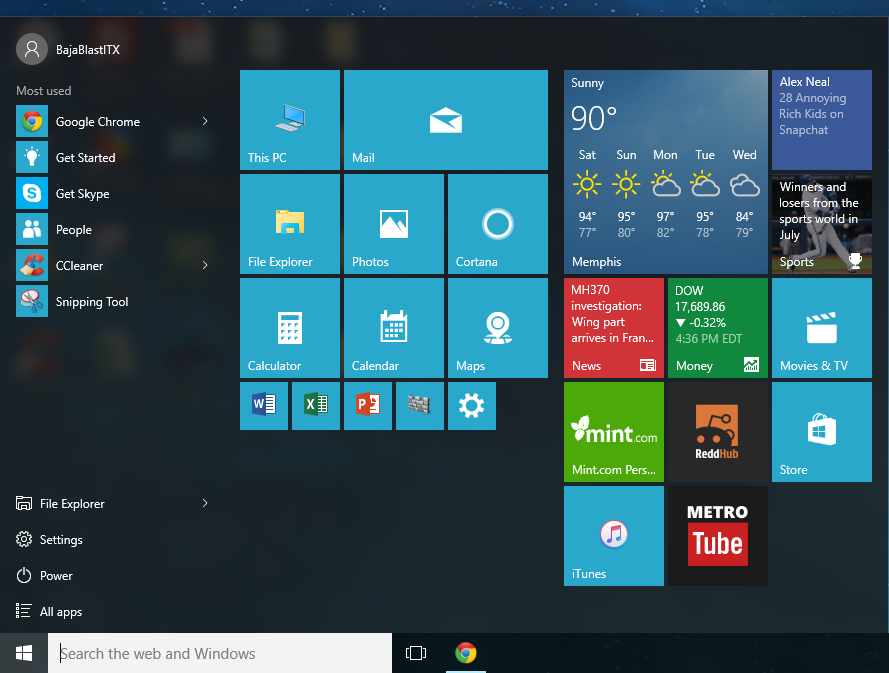
The Start menu has been enhanced to feature Live Tiles where app shortcuts and tidbits of information can be shown at a quick glance. Also included is a smarter search bar which more intelligently searches for files and also searches on the web (although Bing is the default search engine it goes to).

Capture
The new Start menu featuring a classic interface on the left and the Live Tiles interface on the right.

I actually think this is a good compromise between the overboard Live Tile interface that Windows 8 reportedly had and the classic interface that previous Windows 7 users were used to.

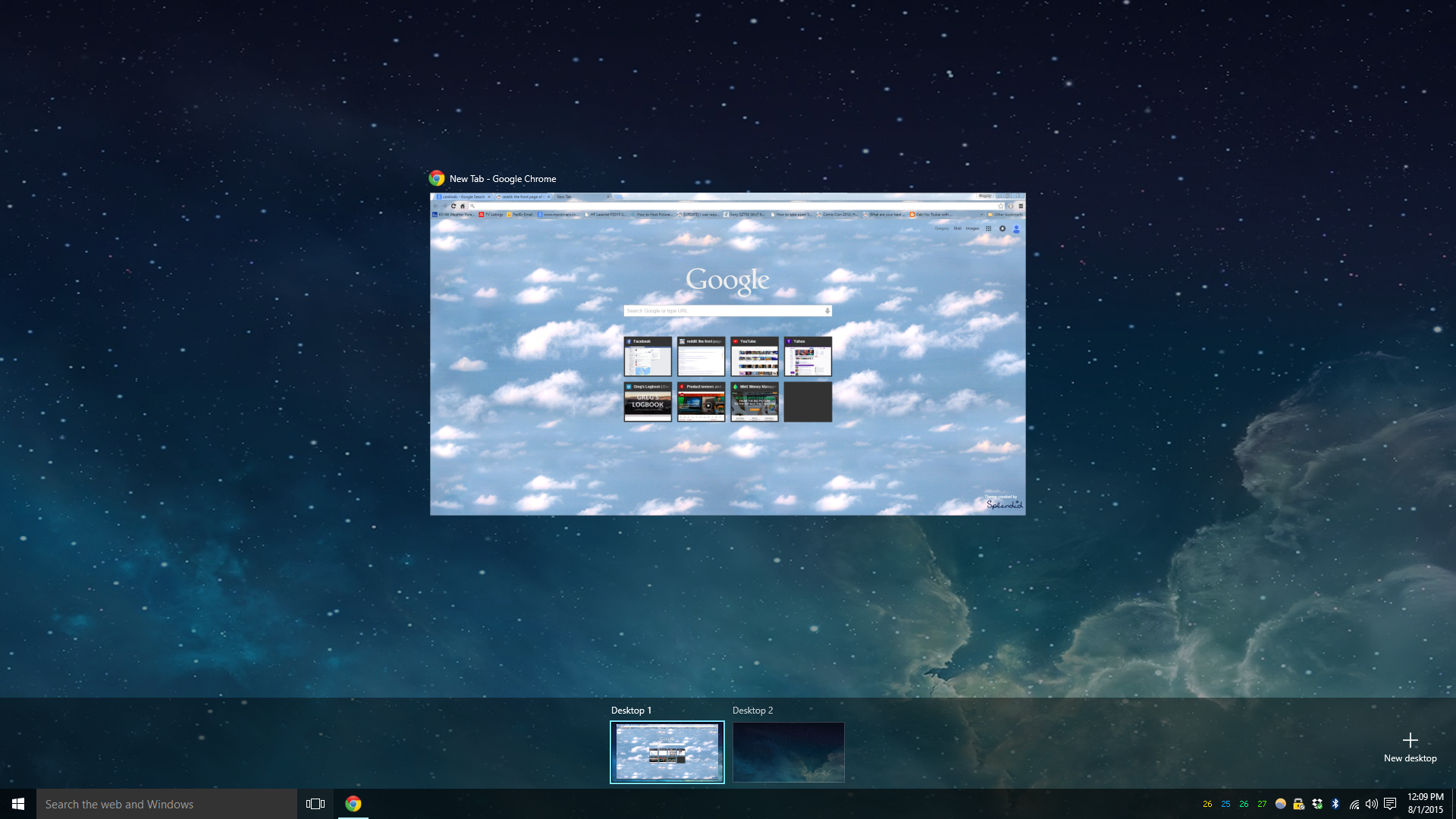
Next, a nice feature taken from OS X is the use of multiple desktops. This effectively allows a user to better handle multiple open programs. I like this feature in OS X and it’s refreshing to see it added.

Capture2
Multiple desktops are now possible by clicking on the Task View icon.

Another feature added from OS X includes a new Action Center pane which opens on the right hand side of the screen, accessible by clicking on the notification icon. This gives the user a quick way of accessing notifications and reminders.

Capture1
An empty Action Center pane.

Windows Snap also includes a new feature called Snap Assist which after snapping a program to the left or right on a screen, a tiled selection pane pops up on the opposing side. This allows the user to select another program to snap to the opposing side, making the multitasking much quicker and more fluid.

Capture6
The Snap Assist feature

Now for some initial negative points:

Some reviewers have commented toward the large list of Privacy settings to tweak for the more privacy-concerned user. By default, many of these settings are switched on if the express installation method is chosen. I would recommend going through these settings upon initial usage.

Capture4
So many Privacy settings to turn off!

Another major problem is users are forced to either accept fully automatic updates through Windows Update or defer updates for a couple months. Updates no longer run through a schedule that can be manually set by the user. I personally haven’t experienced issues on this so far, but others have stated issues with driver compatibility but that is to be expected with a new OS release.

Overall, Windows 10 is a fresh update to Windows 7 and I would recommend the upgrade.

I’ll probably do some more reviews on performance and other features I find in the future, so stay tuned.

Broadway Oyster Bar

So, another food review. Hopefully more tech stuff will be posted. I have some updates to the computer that make a good candidate for more blog posts.

This time, the place we went to is called the Broadway Oyster Bar located on South Broadway and Gratiot Street in downtown Saint Louis. The style and motif was Cajun / Creole, with the restaurant having an “on the bayou” feel. In Memphis, a comparable restaurant would be the Bayou Bar and Grill located on Madison Avenue.

The food was excellent although a bit more pricey than some others. On the menu, there are both cooked and uncooked clams, and a wide variety of seafood, including swordfish, catfish, crawfish, and shrimp. My favorite dish had to be the crawfish enchiladas, which is what I selected based on other people’s reviews. The charbroiled oysters had to be my second favorite with a subtle smoky taste that wasn’t too overpowering.

IMG_3832
House salad with French onion soup, Jambalaya rice, crawfish enchiladas, and a smorgasbord of cooked clams to choose from 

The decor, like the cuisine, looks very similar to Bayou Bar and Grill in Memphis. On a day with nice weather, I would recommend sitting outside on the patio. On some nights, a live band is usually scheduled to perform.

IMG_3834
Mardi Gras memorabilia and other shenanigans covered the walls and ceiling. (Notice the Beale Street sign representative of Memphis)

I would definitely recommend this place for seafood and Cajun lovers. It’s pretty easy to get too as long as the traffic is not too bad in the afternoon and also if there isn’t a Cardinals home game scheduled (Busch Stadium is only about a block away).

Scott Joplin House / Pappy’s Smokehouse

Well, I’m in Saint Louis taking a week of vacation and decided to visit my folks and go sightseeing around the city. I’ll probably plan a bigger vacation going off by myself or with a couple others next summer when I have a bit more saved up.

Our trip today consisted of going to the Scott Joplin House on the corner of Delmar and Beaumont. Scott Joplin spent a short time in this house during his time in Saint Louis. The visit consisted of a short tour including a 15 minute documentary and also a chance to play a couple pieces of Scott Joplin’s music on a player piano. We were also given the opportunity of going on a self-guided tour of the place while we waited for the tour to start on the hour.

playerpiano
Playing “The Entertainer” by Scott Joplin on a classic player piano

The experience was pretty neat. I loved the sound of the player piano. It was almost good enough that from the other room you would think a person was playing, except for subtle variations in tempo when being played.

Up next, for lunch we went to try Pappy’s Smokehouse near the intersection of Olive and North Compton. We expected not to many people to be there at around 1:45pm, but the line wrapped around the inside and out the door! Luckily, the staff there managed the crowd very well, but it still took us around an hour to finally order our food and sit at a table.

As usual, I tried the beef brisket to compare to Memphis style BBQ. We also tried a half-rack of ribs and burnt ends. Overall, the food was OK and didn’t really stand out to me. I guess the quality of Memphis BBQ is partially to blame. The sauces were fairly standard, although the Hoodoo sauce I liked the best. The original sauce was probably their worst one. Anyways, I would probably rank the place ~4 on the Memphis list. It was very comparable to One and Only BBQ in my opinion.

IMG_3813
Pappy’s Smokehouse Beef Brisket Combo with a side of potato salad and baked beans

Anyways, a good time was had nonetheless and we went down to the Delmar Loop afterwards to walk around. We bought a couple records at Vintage Vinyl then went home.

Top 5 – Memphis BBQ

So, after living in Memphis for almost seven months now, I guess it’s time to give a shot at what I think are the best BBQ places in town.

Here is a list of my Top 5 Memphis BBQ restaurants:

1. Central BBQ – This place is almost always crowded with limited seating. The last time we went there though one of the employees was managing people going in and out of the seating area, and seats would open up rather quick. The BBQ there is top notch, especially the ribs and the beef brisket sandwich. I also like their chips which are heavily seasoned with spices and salt.

2. Corky’s BBQ – Went here a couple of days ago and the amount of food they give you is a lot for the price. A $7.99 Pork Sandwich lunch special was a bit more than I could finish. The BBQ sauce was mild, but complemented the sandwich very well. The seating area here is also limited. I’ll bet this place fills up Friday nights and the weekend. Also check out their half-size Onion Ring Loaf:

IMG_3742
Oh boy, half of an onion ring loaf at Corkys. Good but not too good for you. I’m not really one of those people who takes food pics of everything, but I thought this was unique.

3. Germantown Commissary – Went here during the last time my family was in town. Loved their spicier BBQ sauce. Mom ordered a burger here and it was OK. This is probably one of the best BBQ places outside of the 240 loop.

4. One and Only BBQ – This is probably tied with Germantown Commissary, as I had a hard time choosing which was better. The lunch special is just enough to make you full but not too full.

5. Rum Boogie Cafe – Although not officially a BBQ place, this is one of your best bets for BBQ on Beale Street. The brisket sandwich (my benchmark if you haven’t noticed by now) was pretty decent. The gumbo was also good. The location on Beale Street makes for nice people watching.

Others I have tried:
-Tom’s BBQ, Supposedly they have the best rib tips in town according to The Food Network, but when we tried them they were pretty dry. It may have been an off day for them as it was Memorial Day when we went down there. I have yet to try Interstate BBQ, Tops BBQ, and BBQ Shop. Stay tuned for an update in a couple months!

Casio PB-1000 PERSONAL COMPUTER

So I was at work the other day and our resident IT guy had two of these stashed away in one of his drawers. The Casio PB-1000 Personal Computer. Not having much use for them, he gave my coworker and I both a unit.

20150630_104649
The CASIO PB-1000 with extra 32kb RAM module capable of running programs in C61 BASIC and Assembly, Circa 1987

I’m a pretty big fan of old, obsolete systems such as this one and like to tinker around with things such as these. This portable unit running on 3x AA batteries is capable of running programs written in C61 BASIC (a Japanese standard of BASIC) and also can run compiled Assembly programs. For those of you who don’t know what Assembly language is, think of it as being only one step above machine language, or pure 1’s and 0’s. Assembly language is known to be the fastest running language for any system, due to being the closest interface to the hardware itself, but extremely difficult to program with. Fun fact: The game Roller Coaster Tycoon was written using 99% Assembly language by only one person; Chris Sawyer. An incredible feat indeed! No wonder the game ran very well on Pentium II / Pentium III / P4 systems.

Computers made back in the past had such good documentation! In addition to an Owner’s Manual, there is also a Command Reference Manual which describes the operation of most of the system commands.

20150630_183408
The complete set, including Owner’s Manual and Command Reference. An assembly program source code is also shown that runs an electronic keyboard program.

I decided to take the unit home with me to play around with. I found out that the 32kb RAM module had been already installed and boosts the unit’s ram to a whopping 40kb. Unfortunately, the RS232C cable that interfaces the unit to a modern PC was not included. The rare MD-100 disk drive is also absent, leaving no way to transfer programs to and from a PC. Bummer.

Luckily, the documentation and also other sites on the web include many example programs which can be manually input into the PB-1000. My goal is to have the electronic keyboard program up and running here in a couple weeks.

20150630_183421
Menu of programs

New Graphics Card

Well, it arrived yesterday. I got a new Nvidia GTX 980 Ti.

IMG_3724
Evga Nvidia GTX 980 Ti SC w/ Backplate, Supercomputer on a card!

Everything was working smoothly and the install was pretty easy except for one annoying problem that arose during testing it. Coil Whine:(

Coil whine, as I understand it, is caused by the high frequency vibrations of certain components, mainly transformers, inductors, and capacitors, when the coils or materials of the components are exposed to certain electrical loads. When these components vibrate rapidly, they can cause sometimes irritating squeaks and squeals to be emitted. Unfortunately, there aren’t very many ways to mitigate coil whine problems. Most people will try swapping out the graphics card or power supply in an attempt to eliminate coil whine, which is often hit or miss…

Luckily, the source of the coil whine turned out to be coming from the PSU (power supply unit) instead. Strange. During the early stages of building this PC, I had a GTX 760 that had coil whine, but not the lower power PSU I had at the time. Getting annoyed, I swapped the 760 out for a GTX 770, and the coil whine was greatly reduced. Just the issues of high end components I guess.

In an attempt to fix the issue, I ran out to Best Buy and bought an EVGA 600W power supply to swap out the EVGA 750W I had previously. For the most part the whine is greatly reduced and only pops up when running at high framerates. A good solution that I plan to use is by using EVGA Precision software to limit the framerates manually in those cases. Problem solved for now.

In addition to the last post I made, the main function of this card will be for Folding@Home. I ran the computer overnight as usual to fold some more, and this morning my points earned jumped up a whopping 60,000 which is excellent. This number should jump up more rapidly as I complete more work units. Hopefully this will help out the research on new cancer drugs and treatments.

Out of curiosity, I also ran 3DMark on the PC to get a benchmark in and performance numbers on the new card. The results; the PC performed at the 96th percentile of all PCs tested under the 1080p Fire Strike benchmark (I only have the free version of 3DMark). Feels good to be top of the line.

More updates to come, meanwhile the Raspberry Pi has been gathering dust…